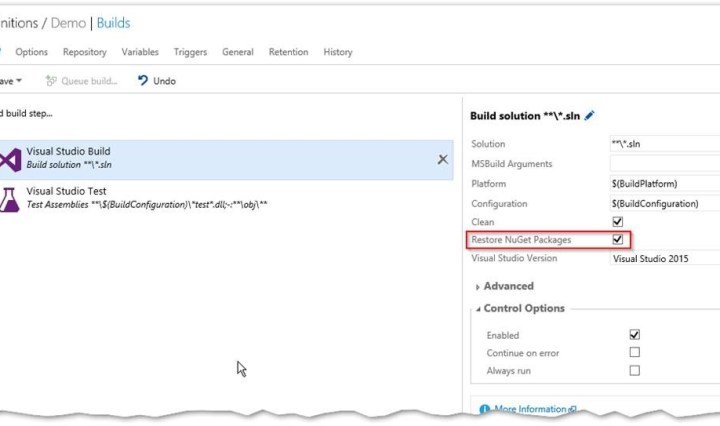
Restore your nuget packages on build server
Disable source control Integration for all your nuget packages and resore them on the build server. Continue reading Restore your nuget packages on build server
Disable source control Integration for all your nuget packages and resore them on the build server. Continue reading Restore your nuget packages on build server

How to fix the error: ‘The running command stopped because the preference variable “ErrorActionPreference” or common parameter is set to Stop: Found value ‘aBcD’ with no corresponding key’ in Relese Management Continue reading Fix Release Management Error ‘Found value ‘aBcD’ with no corresponding key’

I prepared my mobile DevOps demo for our roadshow yesterday. I created an end to end scenario with Xamarin, Visual Studio Team Services (VSTS), the Xamarin test cloud and HockeyApp. I was pretty impressed that it only took me a … Continue reading 12 steps to get started with Mobile DevOps

List all releases for all projects – eather in TFS or VSTS Release Management Continue reading Get a list of all Releases in TFS or Visual Studio Team Services

If you work a lot with github, then you are used to add a .gitignore file when you initialize your repository. If you create a project in TFS or Visual Studio Team Services this is not the case. You have to add your .gitignore file using the team project settings. Under settings navigate to repository settings. Look for the “Ignore File” and click “add”. Edit the file if you need to do any modifications. Now commit the .ignorefile and push your changes to the server. The git integration in Visual Studio and TFS is pretty good – but a lot … Continue reading Where is my git ignore file in Visual Studio?

I have a lot of customers that had played with NuGet packages some time ago and found it too difficult. Wresting with spec and config files and using command line tools is not everybody’s thing. That’s why I’ve written today … Continue reading Manage dependencies with NuGet and TFS

Since the last update to TFS we also have the build steps available to easily integrate SonarQube in your Visual Studio CI process. If you don’t have a SonarQube instance running you can set up one in Azure in nearly no time. Set up service endpoint for SonarQube First you have to set up a service endpoint for your SonarQube instance in TFS or VSTS. Go to the settings of your project (“manage project”), go to services and click “New Service Endpoint”. Select “Generic” and enter the URL to your SonarQube instance and the credentials to connect with. Add and … Continue reading Integrate SonarQube in your TFS or VSTS Build
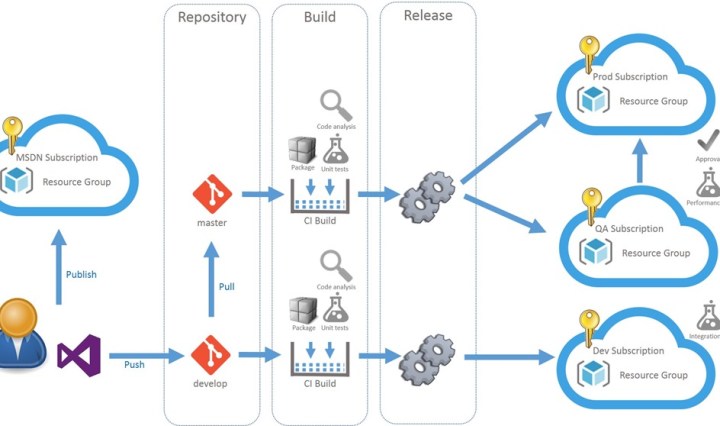
Continuous Deployment of SharePoint Apps (a.k.a Add-Ins) is tricky. The app package is intended to be created for every environment because it must contain a client id and secret. There is also no simple way to automatically trust the app. … Continue reading How to deploy SharePoint Apps with VSTS Release Management

In einem Monat ist es soweit: die ALM Days finden dieses Jahr in Köln am 13. und 14. April statt. Wie jedes Jahr geht es hier rund um die Themen Application Lifecycle Management, agile Entwicklung und natürlich DevOps. Als Speaker sind wieder viele Experten von Microsoft aus Deutschland und den USA und viele meiner MVP Kollegen. Die Anmeldung ist noch offen. Wer sich also bisher noch nicht angemeldet hat, kann das jetzt noch tun. Jetzt anmelden Die ALM Days sind für mich eine der besten Veranstaltungen im Jahr. Man kann sehr gut kontakte Pflegen und bekommt wirklich immer das aktuellste … Continue reading ALM Days 2016 in Köln

The new build system in TFS or VSTS supports saving build definitions as templates. The problem is, that this only works inside a single TFS project. If you want to share your definition with other projects you have to use the REST API. First you have to extract your current build definition. Get a list of all build definitions and check the ids. Then use this ID to get the full definition. Now save the json to a file and remove all the clutter like _links, revision etc. I’ve marked all the sections that you can remove in the following … Continue reading How to move build definitions in TFS to other projects using the REST API
 writeabout.net