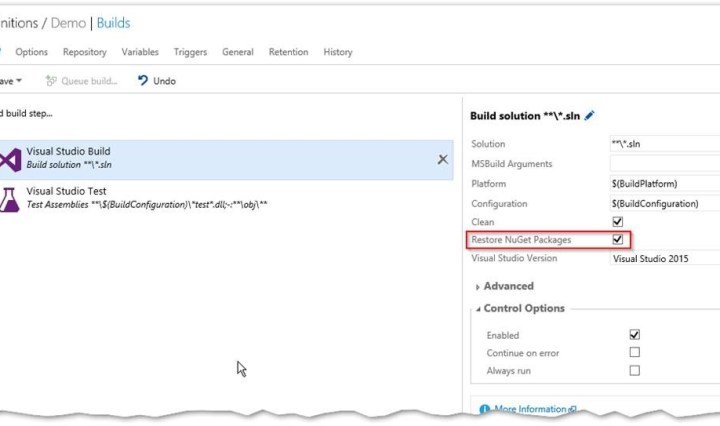
Restore your nuget packages on build server
Disable source control Integration for all your nuget packages and resore them on the build server. Continue reading Restore your nuget packages on build server
Disable source control Integration for all your nuget packages and resore them on the build server. Continue reading Restore your nuget packages on build server

I prepared my mobile DevOps demo for our roadshow yesterday. I created an end to end scenario with Xamarin, Visual Studio Team Services (VSTS), the Xamarin test cloud and HockeyApp. I was pretty impressed that it only took me a … Continue reading 12 steps to get started with Mobile DevOps

If you work a lot with github, then you are used to add a .gitignore file when you initialize your repository. If you create a project in TFS or Visual Studio Team Services this is not the case. You have to add your .gitignore file using the team project settings. Under settings navigate to repository settings. Look for the “Ignore File” and click “add”. Edit the file if you need to do any modifications. Now commit the .ignorefile and push your changes to the server. The git integration in Visual Studio and TFS is pretty good – but a lot … Continue reading Where is my git ignore file in Visual Studio?

SonarQube is a really great solution to monitor and track your technical debt over time. But wouldn’t it be great if the developer could already see in Visual Studio the impact that his commit will have to the sonar dashboard? If you use Visual Studio 2015 and the C# Plugin for SonarQube you can do this with the extension SonarLint. The extension depends on the latest version of the C# Plugin – so make sure that you have the latest version (5.2) installed. In Visual Studio install the extension in the “Extensions and Updated” dialog. This adds a new Tile ‘SonarQube’ … Continue reading Use SonarLint to work on your technical debt in Visual Studio

The new build system in TFS or VSTS supports saving build definitions as templates. The problem is, that this only works inside a single TFS project. If you want to share your definition with other projects you have to use the REST API. First you have to extract your current build definition. Get a list of all build definitions and check the ids. Then use this ID to get the full definition. Now save the json to a file and remove all the clutter like _links, revision etc. I’ve marked all the sections that you can remove in the following … Continue reading How to move build definitions in TFS to other projects using the REST API

Problem If you create an MSDeploy package for a SharePoint or O365 AddIn (a.k.a App) in a team build the package does not include all files (like i.e. language resources). Reason This seems to be a bug in MSDeploy. If you build the app only with /p:Ispackaging=True everything works fine. You get a web package inside the app.publish folder that contains all files. If you work with multiple Publishing Profiles and specify an explicit profile strange things happen. /p:DeployOnBuild=true /p:PublishProfile=NameOfPackageProfile You still get the package but if you look inside the package the folders are missing. Solution If you can … Continue reading Missing files in MSDeploy package

Sync a github fork with the upstream repository using git command or Visual Studio. Continue reading Sync your GitHub fork from within Visual Studio

End-To-End Scenario how to author PowerShell with Visual Studio, GitHub and Pester and test your script in Visual Studio Team Services VSTS / VSO. Continue reading Develop next level PowerShell with Visual Studio and Pester
I’m not trying to cover all relevant aspects of SharePoint announcements that are made the last days on Microsoft Ignite – I’m sure you’re all following it closely. I just want to highlight the most important aspects for SharePoint developers and the impact they have on my work. Provisioning Engine The Office365 Developer Patterns and Practices group announced a provisioning engine for provisioning SharePoint artifacts (sites, lists, fields, content types etc.). It takes a xml file with a custom syntax as the input and provisions the content using the API. It also works both ways – you can use the … Continue reading Side notes for SharePoint and O365 developers from #MSIgnite

If you use ApplicationInsights in your SharePoint Apps you might also want to include it in all sites of the hosting web. You can do this by injecting the corresponding JavaScript using the client side object model (CSOM) and UserCustomActions. Go to https://portal.azure.com/ and open your ApplicationInsights-Application or create a new one. Go to “Quick start” – “Get code to monitor my web pages” and copy the code insight the script tags. Save the script to a JavaScript file and upload it to your O365 site (i.e. to /Style%20Library). Use the following PowerShell script to inject the JavaScript file without … Continue reading Add ApplicationInsights to your O365 SharePoint sites
 writeabout.net